
Why Every Business Should Add an AI Chatbot in 2026

A simple guide to using AI chatbots for better service, more leads, lower costs, and faster replies in 2026.
Customers judge more than product quality. They also care about fast replies and easy access to help. A smooth buying process also matters. A late-night delay may send a buyer to your rival.
An AI chatbot is now a useful business tool. It can answer common questions and guide visitors to the right products. It can also collect leads, book visits, and send hard cases to a person. It works during nights, weekends, busy campaigns, and sudden sales peaks.
AI should not replace your staff. Instead, it should free them from the same basic questions. A bot can handle order updates, opening times, and other simple tasks. Your team can then focus on work that needs care, skill, or sound judgment.
The central business case
A well-built chatbot gives your business more room to grow. Customers get faster answers. Sales teams get useful details. Support staff gain more time for cases that need a human touch.
Customers Expect Immediate Answers
The fastest brands shape what customers expect. People now expect quick search results, order updates, and self-help tools. They want to check stock, service areas, and booking times at once. If they cannot, they may leave instead of filling out a form.
An AI chatbot fills this service gap. It can greet visitors and understand common questions. It can also give a useful first answer at any time. This helps when people compare products, check terms, book services, or fix urgent issues.
Availability without an overnight support shift
A chatbot can handle many chats at once. No visitor needs to wait behind nine others. This keeps replies fast during launches, sales, nights, and weekends. It also helps online stores whose buyers shop after work. Businesses can learn how AI is helping smaller ecommerce stores compete with larger retailers.
Fast service does not mean AI must solve every issue. Each customer should get help and a clear next step without a long wait.
Fast answers must also be right. A quick but wrong answer can break trust. Use approved business facts to guide the chatbot. It should admit doubt and pass the chat to a person when needed.
An AI Chatbot Can Reduce Customer Service Costs
Support teams often get the same questions each day. Customers ask about orders, hours, returns, bookings, passwords, delivery, and products. Each request may take only a few minutes. Yet those minutes can add up to a large cost.
A chatbot can solve or sort these chats before they reach your team. This saves money and makes better use of staff skills. Workers can spend more time on complaints and rare account issues. They can also help key customers and handle cases that need empathy.
Think productivity, not replacement
A sound budget plan should not assume that a chatbot replaces a whole team. Instead, look at how it cuts the workload. The same team may then serve more customers without a matching rise in staff costs. Queues shrink, service stays steady, and new staff learn fewer scripts.
- Lower cost per conversation: Simple questions take less staff time.
- Greater team capacity: Support staff can solve more hard cases each shift.
- More consistent answers: Customers get the same approved rules in each chat.
- Scalable coverage: Demand can rise without the same growth in wait times.
Cost plans should cover software, setup, links, staff training, checks, and content updates. Even with these costs, the AI chatbot return on investment can be strong. Start with one busy task that you can track. Do not try to automate everything at once.
Turn More Website Visitors Into Qualified Leads
Most websites wait for visitors to act. Users must find the right page or fill out a form. This setup can lose buyers who still have doubts. One open question about price, stock, delivery, or setup may make them leave.
A chatbot can step in at that key moment. It can answer sales questions and suggest useful products. It can explain service options and collect contact details while interest is high. Unlike a basic pop-up, it can change each question based on earlier answers.
Qualification gives sales teams a head start
The chatbot can ask about needs, location, budget, timing, company size, or order volume. It can then send the lead to the right person or booking page. It may also point them to a store or product group. A CRM or email tool can save the chat and lead details.
This background helps your sales team. Staff can start with a useful tip instead of asking the buyer to repeat everything. Online stores can also use WhatsApp ordering and notifications to turn chats into checkout.
A better measure than conversation volume
Do not judge a sales chatbot by chat volume alone. Track good leads, booked meetings, and sales tied to the bot.
How an AI Chatbot Improves the Customer Journey
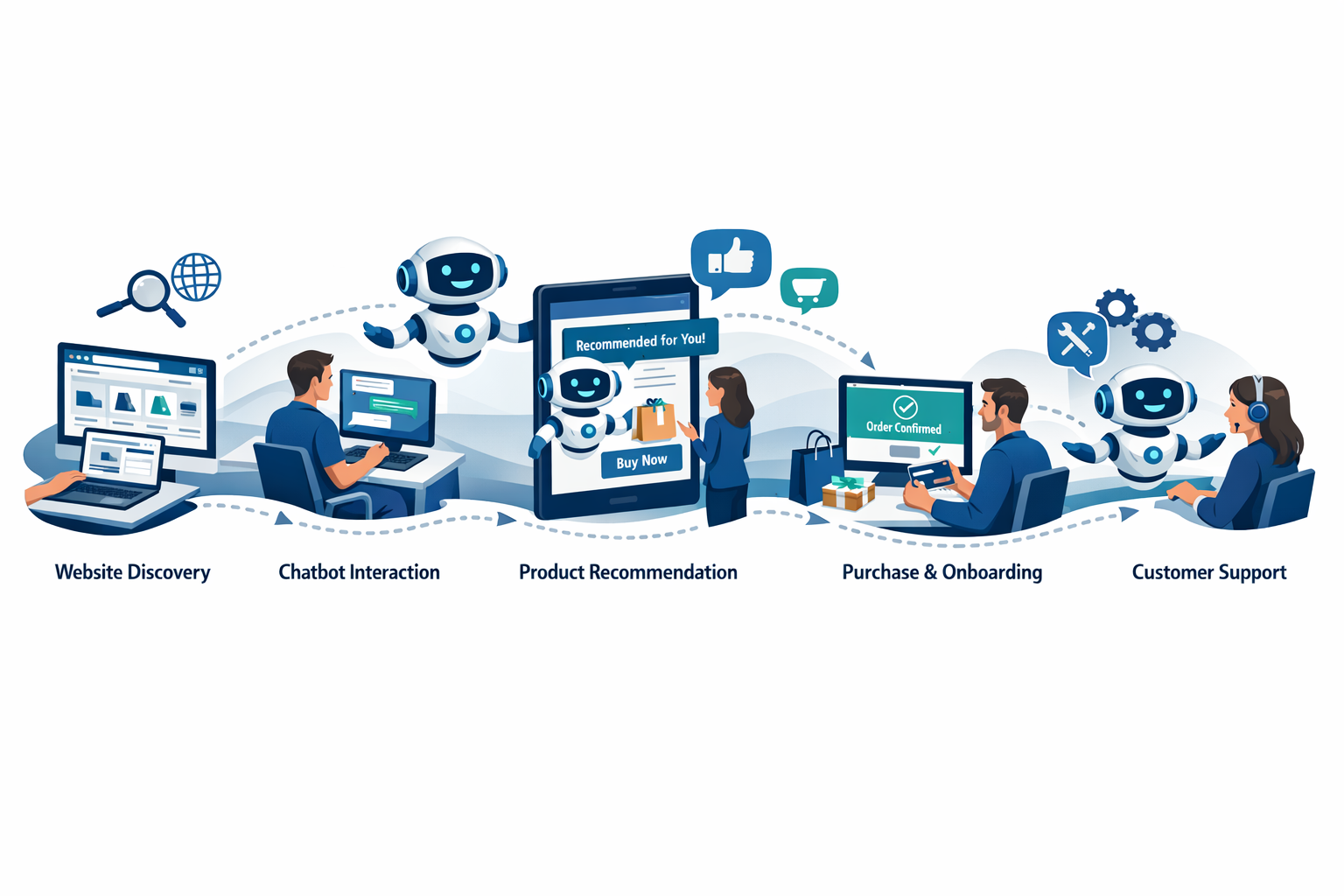
A chatbot can help at each stage of the customer journey. It can explain product groups and narrow choices. Before a sale, it can answer questions about price, features, stock, fit, and rules. After a sale, it can share order details, setup help, guides, and support options.
Guidance reduces decision friction
Too many choices can make buying hard. A visitor may struggle to compare many plans or products. A chatbot can ask about use, needs, limits, and price. It can then offer a short list. This helps when taking a store online. A clear site can reduce the stress covered in this retailer’s guide to moving from a physical shop to an online store.
The chatbot should not block access to your team. Urgent, private, or hard issues need a clear handoff. The staff member should get the chat history. This keeps the customer from starting again.
Conversations reveal what analytics may miss
Site data can show where visitors leave. Chat logs can help show why they leave. Common questions may reveal unclear product text, hidden delivery facts, or vague prices. These chats can improve your site, products, sales tools, and policy details.
Common Concerns About AI Chatbots—and How to Address Them
Businesses should take care when using AI. A poor chatbot may sound cold or trap users in a loop. It may also give wrong answers with too much trust. These are setup problems. They are not reasons to reject the tool.
Trust begins with transparency
Customers should know when they are chatting with AI. The bot should state what it can do. It should also show a clear way to reach a person. This honest approach sets clear limits and builds trust.
Good source material helps the bot sound natural. Clear writing also matters. Do not pretend the bot is human. Give it correct company facts and a voice that fits your brand. Set firm limits to stop false claims, made-up rules, or unsafe advice.
Privacy and security require deliberate design
Check how each vendor stores, uses, and guards data. Collect only the personal details needed for the task. Set access rules and clear times for data removal. Follow all privacy laws that apply. Do not gather passwords, card details, or health data in an open chat.
- Limit answers to trusted and approved sources.
- Check failed and passed-on chats often.
- Test prompts that may cause unsafe or off-topic answers.
- Give users a clear path to human help.
- Update rules and product facts as your business changes.
AI does not need to know everything. It should make trusted business facts easy to find. It should also know when people must step in.
Start With a Focused, High-Value Use Case
A good chatbot plan starts with one clear goal. Do not try to cover sales, service, billing, and tech help at once. That adds risk and makes results hard to track. Pick one useful result that you can measure.
- Define the objective. Cut repeat tickets, collect late leads, gain bookings, or help shoppers choose products.
- Identify common questions. Check tickets, searches, emails, calls, and forms for common needs.
- Build an approved knowledge base. Use current web pages, rules, product guides, and checked staff advice.
- Design escalation rules. List which requests need a person. Plan how the bot will share the chat details.
- Launch a limited pilot. Test answers, tools, user views, and rare cases before you grow.
- Assign ownership. Choose who manages content, privacy, data, and ongoing changes.
The chatbot must fit the rest of your website. Fast chat cannot fix slow pages or a hard checkout. Site speed still plays a key role in sales. Review these useful ecommerce site-speed benchmarks.
A practical first pilot
Choose your 20 most common questions. Link the bot to approved answers and add a human handoff. Run the test on a few pages. Then check if customers get faster help and staff save time.
Measure the Business Impact of Your Chatbot
Treat a chatbot as a business tool, not a new toy. Record your current results before launch. This gives you a clear starting point. Without it, normal sales shifts may look like success or failure.
Response time
How fast visitors get a useful first answer.
Resolution rate
The share of chats solved without more support.
Qualified leads
Leads with enough detail for useful follow-up.
Customer satisfaction
Whether customers found the bot useful and correct.
Support teams should track fewer tickets, handoff rates, cost per solved chat, response time, and customer scores. Sales teams should track good leads, meetings, sales rates, and revenue linked to the bot. They should also count leads gained outside work hours.
Do not focus only on fewer support tickets. A bot may seem useful because it blocks access to staff. Check speed along with quality. Track customer scores, repeat chats, exits, and handoff results.
Improvement should be continuous
Check chat logs for missed questions, wrong answers, failed searches, and exit points. Add missing facts and make unclear answers simpler. Update the rules that send chats to staff. Products, prices, rules, and customer needs will change over time.
A monthly check may suit a steady chatbot. New launches and fast growth may need weekly checks. Regular updates turn a basic tool into a lasting business gain.
Conclusion: Build Faster Service Without Losing the Human Touch
The benefits of AI chatbots for businesses are clear. They offer fast replies, lower support demand, better leads, and steady service. They also help a business handle more demand. These gains still need good planning. The bot needs correct facts, a clear role, safe data use, and human backup.
Start with a real problem, not AI for show. Pick one common task and record your current results. Run a small test and learn from real chats. If the bot saves time and keeps customers happy, add more tasks slowly.
In 2026, customers see fast service as part of what they buy. Timely help makes a business easier to trust. It also makes buying and coming back much easier.
Make Every Customer Conversation Count
Start with one useful chatbot task. Run a small test and track the results. Then build faster service, better leads, and steady growth.